Other apps show numbers. Diag4You tells you what's going on with your car.
We'll send one message when the beta is ready. Email only, nothing else.
Read-onlyNo accountResults offline
How it works
Four steps, one screen
No manual, no code tables. The app takes you from plugging in the adapter to a clear result.
1
Connect
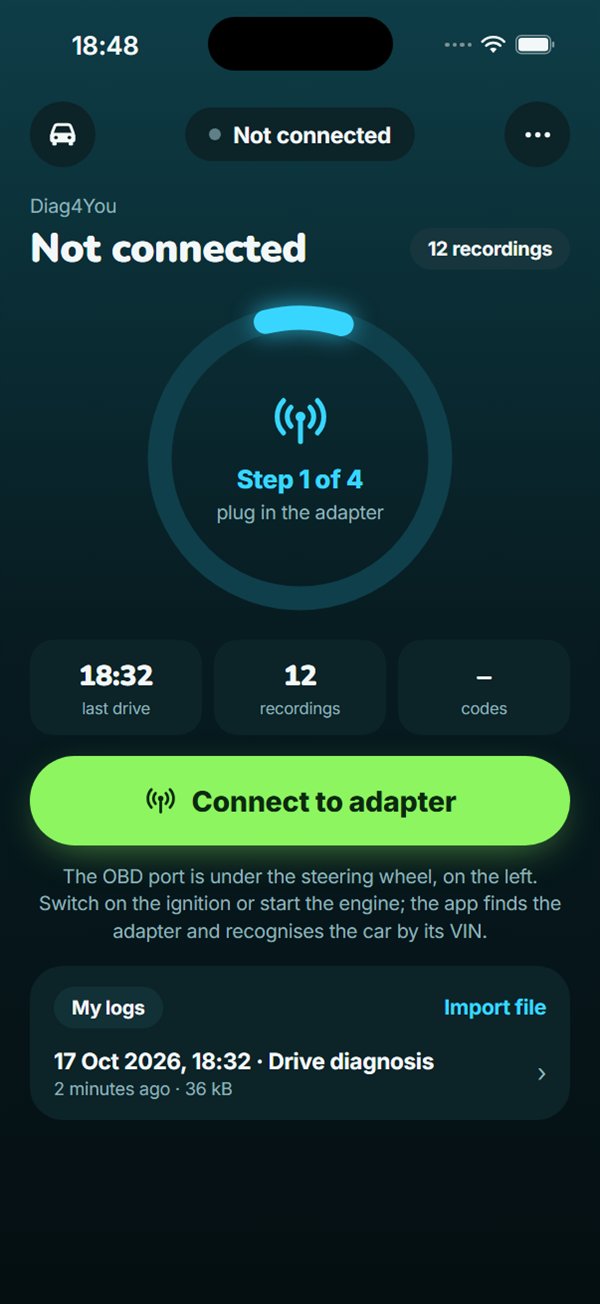
Plug the adapter into the OBD port and switch on the ignition. The app finds the adapter and recognises the car by its VIN.
2
Start
Reads fault codes from the engine, gearbox, ABS, airbags and electrics while parked.
about a minute
3
Drive, then Stop
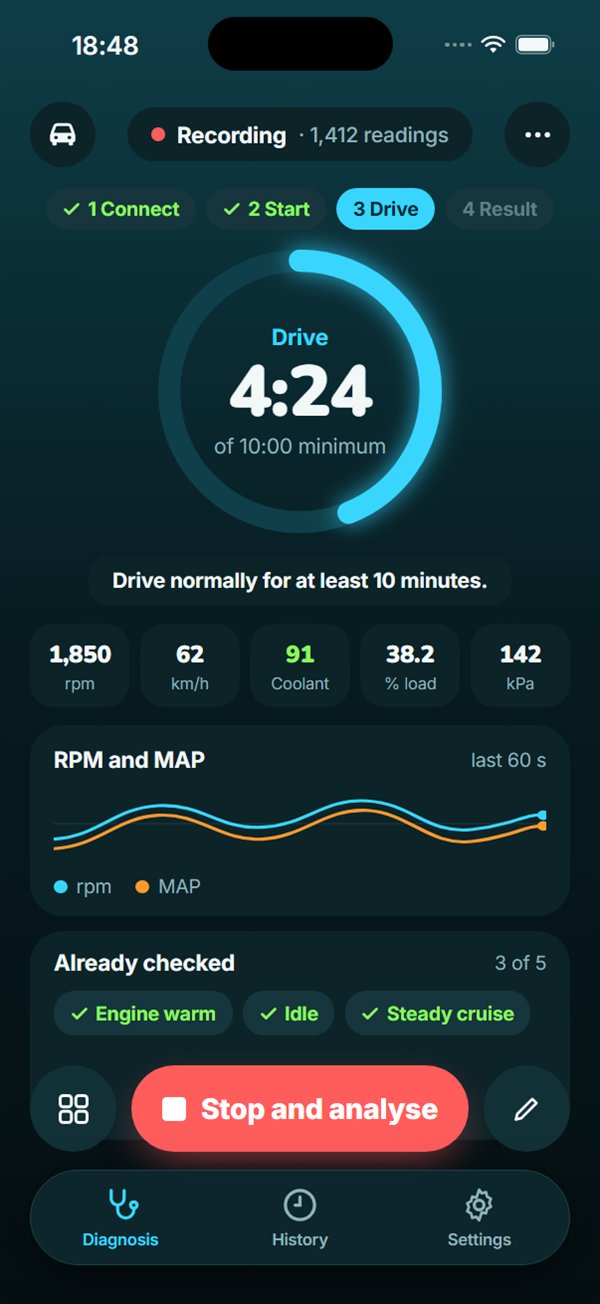
Drive as usual. The ring counts the time, and a longer drive gives a more precise result.
at least 10 minutes
4
Analyse
Results straight away, offline: what to check and why. AI analysis and a PDF report on request.
1 · ConnectOne button and a hint where the port is.
3 · DriveA ring, five live values and a list of what's already checked.
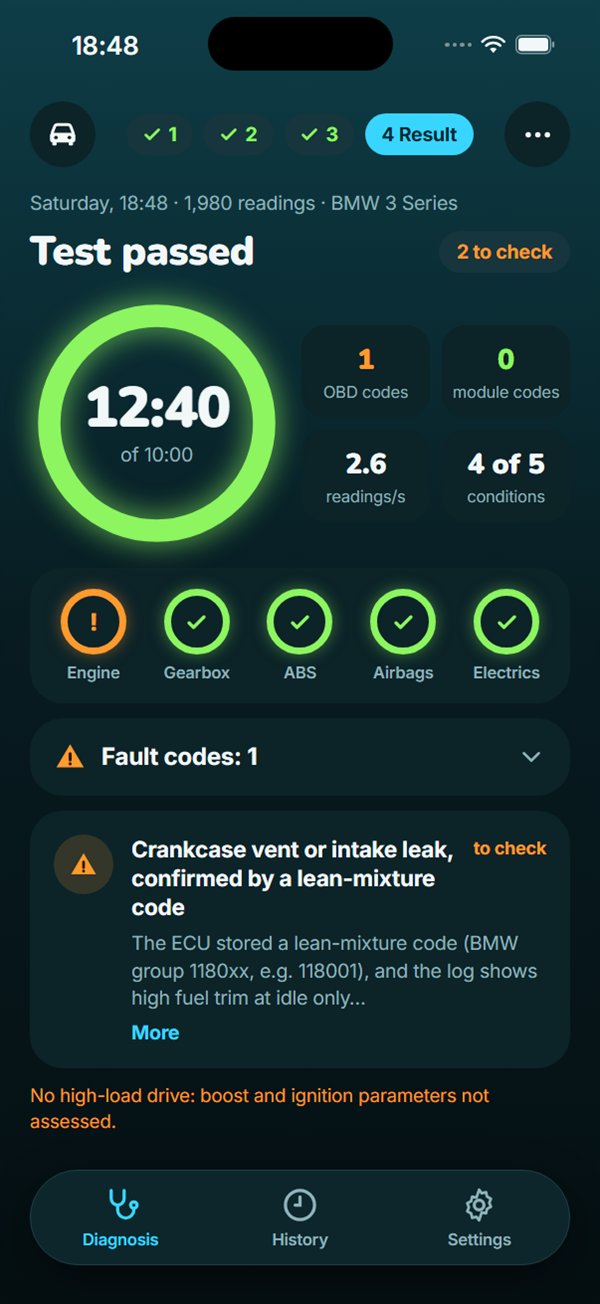
4 · ResultSystem status and findings with an explanation.
Why it sees more
It sees more than a fault code scan
An engine computer only stores a fault code once something crosses a threshold. Before that, a developing fault often shows up in the live data: the turbo can't reach target boost, the DPF builds up more and more back-pressure, fuel trims creep up. Diag4You records these parameters while you drive and assesses them with rules for your engine.
Live driving databoost, DPF, fuel trims, temperatures, ignition
Driving conditionscold and warm engine, idle, full load
On-phone analysis
over 400 rules for specific engines, from public sources
comparison with this car's earlier drives
assessed separately for each driving condition
Works offline.
!Turbo can't reach target boost under load
No fault code yet. First check the intake and intercooler for leaks, then the turbo actuator.
worth checking
How a fault develops
illustration
1First deviationNo warning light yet, but the drive recording already shows a change in the data.
2Fault code and warning lightThe value crosses the ECU threshold. Only now does a plain code scan see anything.
3BreakdownA repair at this stage usually costs more than at stage 1.
What gets checkedCode scanDiag4You
Fault codes stored in the control units✓✓
Live parameters while drivingboost, DPF back-pressure, fuel trims, temperatures, ignitionno✓
Assessment in different conditionscold and warm engine, idle, under loadno✓
Rules for specific enginesover 400 rules from public sourcesno✓
Comparison with the car's earlier drivesno✓
What to check first, in plain wordsno✓
Sample findings from a drive recording
sample data
Boost at full load
ECU targetactualmissing boost
Findingworth checking
Measured
0.3–0.4 bar below target from 2500 rpm
Expected
actual close to target across the range
Fault code
none yet
What to check first
Intake and intercooler for leaks, e.g. a smoke test
Turbo actuator and variable vanes
The turbocharger itself: shaft play, oil traces
DPF back-pressure, drive by drive
differential pressure at the same exhaust flownormal rangecode threshold
Findingworth checking
Measured
back-pressure rising for 6 drives, over 80% in total
Expected
a steady level that drops after every regeneration
Fault code
none yet
What to check first
Whether regenerations complete: short trips interrupt them
The differential pressure sensor and its hoses
Ash load in the filter
Fuel trim during the drive
total fuel trimidlenormal ±5%
Findingworth checking
Measured
+14% at idle, +2% when cruising
Expected
within ±5% in both conditions
Fault code
none yet, the ECU is compensating
What to check first
Unmetered air: crankcase vent, vacuum hoses
Intake manifold gasket
Mass air flow sensor
Engine warm-up
healthy cooling systemthis recording
Findingworth checking
Measured
74 °C after 20 minutes of driving
Expected
80–95 °C after about 10 minutes
Fault code
none yet
What to check first
The thermostat: whether it's stuck open
The coolant temperature sensor
Misfires per cylinder
stands out
Findingworth checking
Measured
cylinder 6 clearly more often than the rest
Expected
even across all cylinders, close to zero
Fault code
none yet, too few events
What to check first
Swap the cylinder 6 coil with a neighbour and drive again
The spark plug
The cylinder 6 injector
What you get
A verdict, not a table of numbers
Five systems at a glance and one sentence on what to do next
The knowledge base runs on your phone and turns codes and readings into clear findings: what to check first, which parts may be involved and what to tell the workshop.
EngineOK
GearboxOK
ABScheck
AirbagsOK
ElectricsOK
example
History and trends
Every drive is saved to the car's history. The app compares them and spots changes early, such as a rising pressure difference across the DPF.
DPF pressure difference, drive by drive
Before and after the repair
Record a drive before the workshop visit and another one after. You'll see in black and white whether the repair helped.
Before2 things to check
Afterall systems OK
PDF report for the workshop
Your mechanic gets a ready list: what to check first and why.
Before buying a used car
A 10-minute test drive with the adapter tells you what to ask the seller.
AI analysis on request
For the curious, a full write-up of the drive. Only a numeric summary is sent for analysis, never the raw file.
Workshop replyPlease come in on Tuesday at 9:00, we'll check the crankcase vent and intake.
example
Safety and privacy
It only looks, it never touches
Read-only
The app reads data from the car and changes nothing. It clears fault codes only when you explicitly ask, with the car parked.
Data stays on your phone
Your drive recordings stay with you. Results are produced on the phone without sending anything.
AI only sees numbers
When you ask for AI analysis, we send a numeric summary of the drive and the codes, not the raw file.
VIN masked in links
The VIN is masked in links shared with a workshop.
Deleted after 180 days
Recordings sent to a workshop are deleted from the server after 180 days.
The workshop decides
Diag4You suggests what to check. Whether the car is fit to drive is for a mechanic to decide.
FAQ
Frequently asked questions
Does it replace a workshop?
No. Diag4You tells you what looks suspicious and what to check first. Diagnosis and repair decisions are made by a mechanic.
Does the app clear fault codes?
Only when you explicitly ask, and only with the car parked. It never clears anything on its own.
Which adapter should I buy?
We recommend the Vgate vLinker MC-iOS or OBDLink CX. The adapter must use Bluetooth LE, as only those connect to an iPhone.
Which cars does it work with?
BMW, MINI, VW, Audi, Škoda, Seat, Cupra, Porsche, Toyota, Lexus, Renault, Dacia, Hyundai, Kia, Peugeot, Citroën and DS. Mercedes-Benz via standard OBD for now. Not yet Opel/Vauxhall or Ford.
How long does a test take?
About a minute to read codes while parked, then at least 10 minutes of normal driving. The longer you drive, the more precise the result.
Does it work offline?
Yes. Reading, driving and the knowledge-base result all work offline. You only need a connection for AI analysis and sending a report to a workshop.
Be among the first to check your car
The app is in testing. Leave your email and we'll let you know when it's ready to download.